
Integration with Oracle Health EHR
Connecting Patient Records
Discover how Biomarks.ai integrates with Oracle Health EHR to import patient records and send clinician-approved AI assessment summaries to patient charts.
Connecting Health Assessments with Oracle Health Patient Records
Discover how Biomarks.ai connects with Oracle Health to bring authorized patient information into your assessment workflow, simplify on boarding and help clinicians prepare for consultations.
Biomarks.ai is developing an Oracle Health integration to help healthcare professionals connect existing patient records with its AI-powered health assessment platform. Our sandbox demonstration shows the workflow for authorizing an Oracle connection, selecting patients, reviewing matches and linking an Oracle patient with an existing Biomarks.ai profile.
This provides a foundation for bringing patients into Biomarks.ai, where clinicians can collect information before consultations, review assessment responses and identify areas requiring further attention. The demonstrated connection uses Oracle’s public sandbox. Production availability depends on the healthcare organization’s environment, permissions and deployment requirements.
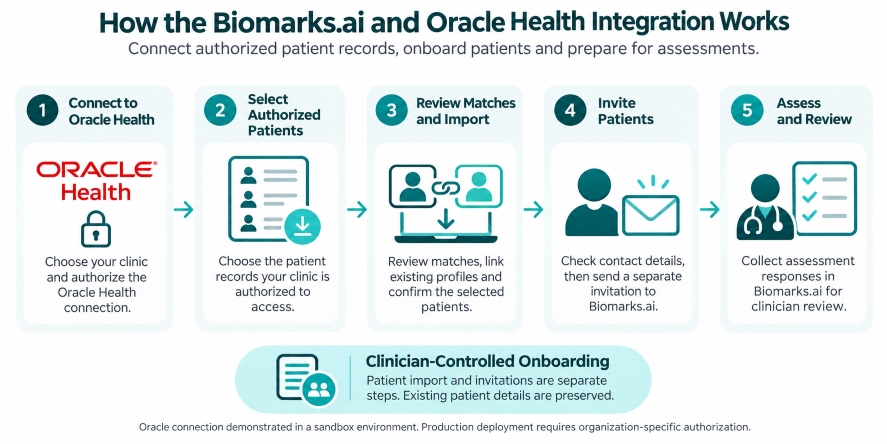
How Biomarks Integrates with Oracle Health
1. Connect Your Clinic’s EHR
From the Biomarks.ai dashboard, select Connect Your EHR, choose your clinic and select Oracle Health. The connection workflow guides the user through Oracle authorization before returning to Biomarks.ai. The demonstration shows successful sandbox authorization and a connected Oracle status.
2. Select Your Authorized Patients
Choose the patients you are authorized to access and bring into Biomarks.ai. The demonstrated workflow uses a specified list of Oracle patient identifiers, with an authorization confirmation before patient information is previewed. This gives the clinic control over which patients are included in the import.
3. Review Patient Matches
Before importing, review the patient information and any matches with existing Biomarks.ai profiles. The workflow allows users to check the selected patient, review the proposed match and confirm the appropriate action. In the demonstration, the Oracle patient is linked to an existing Biomarks.ai profile, with existing demographic details preserved.
Contact details requiring review are also highlighted, helping staff identify information that needs attention before patient communication.
4. Confirm the Import or Link
After reviewing the match, confirm the selected patients. Biomarks.ai displays a confirmation when the patient profile has been imported or linked, with an option to return to the patient dashboard. Importing and patient communication are separate steps. The import workflow creates patient profiles and EHR links without automatically sending invitations or assessments.
5. Invite Patients to Biomarks
From the patient dashboard, staff can send an invitation for a patient to access Biomarks.ai. Keeping this step separate gives the clinic an opportunity to check contact details and registration status before sending an invitation. The video also demonstrates the dashboard’s invitation action and its success confirmation.
Bring Structured Assessments into Your Patient Workflow
Once patients are onboarded, clinicians can use Biomarks assessment tools to gather information before or between consultations. Start with a pre-built assessment template or create your own. Customize questions, scoring, clinical logic, red flags and AI-assisted evaluation to suit your specialty and approach.
For example, a sleep clinic could collect information about sleep patterns, daytime tiredness, medication use and the impact of symptoms on daily activities before an appointment. The clinician can then review those responses and focus the consultation on the concerns that need further exploration.
AI-assisted evaluation supports the review process. Clinicians remain responsible for interpreting results and making clinical decisions.
Benefits for Healthcare Professionals and Clinics
Reduce repeated patient administration
Bring authorized patient information into Biomarks.ai and link existing profiles, reducing the need to recreate patient details manually.
Support accurate patient matching
Review matches before confirming an import, preserve existing patient information and identify contact details that need checking.
Control patient onboarding
Select the patients to include and manage invitations separately from importing.
Standardize information collection
Use reusable assessment templates to gather consistent information across your patient population while retaining the flexibility to customize each assessment.
Prepare for more focused consultations
Collect patient responses in advance, review important information and potential red flags, and spend more appointment time discussing patient needs.
Watch the Oracle Health Integration Demonstration
See the sandbox workflow from EHR connection through patient matching, linking and dashboard access. The demonstration focuses on patient onboarding. Sending assessment summaries back to an Oracle Health patient chart is outside the workflow shown.
Explore Oracle Health Integration for Your Clinic
Interested in connecting your Oracle Health environment with Biomarks.ai? Contact our team to discuss your patient onboarding needs, available assessment templates and the requirements for deployment within your organization.
Connected Patient Assessment Workflow
This workflow is designed to reduce the need for clinicians to switch between disconnected systems or manually transfer clinical assessment documents.
It also provides a foundation for onboarding authorized patient groups, making Biomarks.ai more practical for clinics managing larger patient populations.
Benefits for Healthcare Professionals and Clinics
Reduce Manual Patient Administration – Import patient information from Oracle Health into Biomarks.ai rather than manually creating patient profiles, helping reduce duplicate data entry and administrative effort.
Connect Clinical Assessments with Existing Patient Records – Bring assessment results and clinician-approved AI summaries into the patient’s Oracle Health chart, supporting a more connected clinical workflow.
Support Consistent Clinical Documentation – Use pre-built assessment templates and structured questionnaires to standardize how patient information is collected, evaluated and summarized.
Maintain Clinician Oversight – Clinicians review and approve assessment summaries before they are transferred to Oracle Health, helping ensure that AI-generated information remains subject to professional judgment.
Support Patient Data Integrity – Patient matching, duplicate detection and permission/consent checks help support responsible patient record management across the two platforms.
Supporting Better Connected Healthcare
Biomarks.ai is building an AI-powered health intelligence platform that complements existing clinical systems rather than replacing them.
Our Oracle Health integration is an important step toward enabling healthcare professionals to combine existing patient records with structured health assessments, AI-generated clinical insights and more efficient documentation workflows.
By connecting clinical assessments with established EHR platforms, Biomarks.ai aims to help healthcare providers spend less time transferring information between systems and more time reviewing patient health information and supporting informed care decisions.
Learn More About Biomarks.ai and Oracle Health Integration
Interested in connecting Biomarks.ai with your clinic’s Oracle Health EHR environment?
Contact our team to discuss the integration, available assessment templates and requirements for future production deployment.

